Claude in Chrome Errors: 4 Browser Automation Snags, Fixed
Hi there.
You hand the browser to an AI agent, step away, and come back to a message that says the task stopped.
If you run a one-person business, that stalled task is a delayed upload, a delayed report, or a delayed order.
This post is a symptom-first guide for that moment.
Each section starts with what you see on screen, then gives the response I use.
There are four symptoms and three short habits behind them, and each habit has a label you can remember.
1. Start here: match the message to a response
Read the first line of the error before you change anything.
Each message points to a different response.
- "not in group" error: go to section 2 (Tab Check).
- "Page still loading" on a file upload: go to section 3 (Retry).
- Chrome window frozen while a conversion job runs: go to section 4 (One at a Time).
- A 429 error from a browser tool: go to section 5 (local work first).
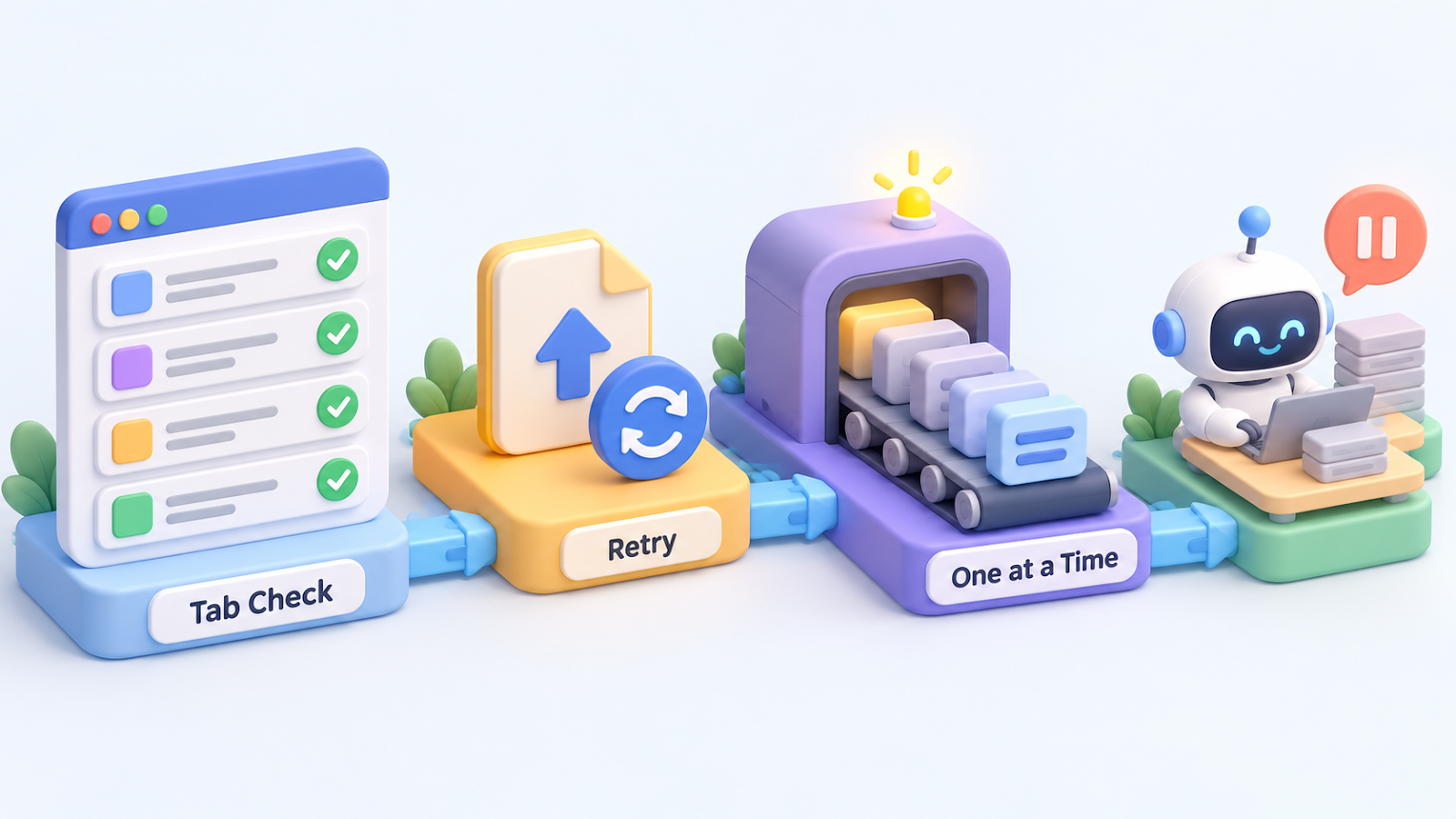
The diagram above carries three of these labels: Tab Check, Retry, and One at a Time.
The fourth response has no label because it is a change of order: do the work on your own computer first, then return to the browser.
Sections 2 to 4 explain each label in turn.
2. Symptom: "not in group" (response: Tab Check)
You see a "not in group" error, and the agent cannot find the tab it was working in.
The cause is a closed tab.
When a tab is closed, Chrome creates a new tab group.
The tab the agent remembers is no longer in the group the agent is using.
The agent's next step then fails.
Tab Check is the response, and it has two parts:
- At the start of every turn, the agent lists the open tabs before it does anything else.
- The agent never closes the last remaining tab.
The first rule gives the agent a fresh list of the tabs before each move.
If you write instructions for your own agent, put both rules in the first lines.
Photo: Matheus Bertelli on Pexels
3. Symptom: "Page still loading" on an upload (response: Retry)
You ask the agent to upload a file on a video site's management page.
The agent opens the page and tries the upload at once.
The first attempt fails with "Page still loading".
Run the same upload a second time and it goes through.
Retry is the response: one more attempt, and nothing else.
Do not start by hunting for a cause.
Do not change the file, the account, or the settings.
Let the page finish loading, then run the same step again.
Retry has a limit.
It applies to the first attempt right after navigating to a new page.
If the second attempt also fails, read the new error message, because it is a different symptom.

Photo: Markus Winkler on Pexels
4. Symptom: Chrome freezes during a heavy job (response: One at a Time)
You start a heavy conversion job on your PC.
The Chrome window freezes while the job runs.
The browser work stops responding.
One at a Time is the response, and it has two parts:
- Do not run the browser work and the heavy conversion job together.
Finish the browser work first, then start the conversion job.
- Do not start the same heavy job twice at the same moment.
The second part comes from a failure I saw.
I started the same heavy job twice at once for one project.
The temporary files were corrupted, and the conversion crashed partway through.
Give each heavy job its own turn.
So split the order into steps:
- Browser work.
- Heavy job, alone.
- The next heavy job, only after the first one ends.
5. Symptom: a 429 from a browser tool (response: local work first)
You see a 429 error from a Chrome tool, such as the find tool.
The 429 appears when the 5-hour usage limit has been reached.
Sending the same browser request again returns the same 429.
The response is a change of order:
- Stop retrying the browser task.
- Find out when the limit resets.
- Until that time, do the work that stays on your own computer, such as writing, editing files, or preparing assets.
- When the limit resets, go back to the browser task.
This is different from Retry in section 3.
A "Page still loading" error clears when the page finishes loading.
A 429 clears only when the limit resets.
The takeaway
Read the message, then pick the response:
- "not in group": Tab Check.
- "Page still loading": Retry.
- Frozen Chrome or a crashed conversion: One at a Time.
- 429: local work first.
Where has your AI agent stalled in the browser?
Tell me in the comments.
Related post:
Thanks for reading.

Comments
Post a Comment