Scheduled Post Hits a Lock: Wait, Skip, Never Retry
Hi there.
I run a one-person online business, and two AI agents publish to the same blog for me.
One of them has a scheduled job that posts at a fixed time while I am away from my desk.
The question that matters most is what that job does when the other agent is already publishing.
This post covers the three behaviors I rely on: wait, refuse a stranger's unlock, and stop instead of retrying.
The scenario: a scheduled post meets a busy destination
My scheduled job fires at its set time and wants to publish.
At that moment the other agent may be in the middle of its own publish to the same blog.
If both write at once, I can end up with a duplicate post or a half-updated page.
I use a lock to prevent that, and the rule around it is short.
Right before any outside change, the agent takes the lock for that blog.
It releases the lock only after it has read the live result back and written the record.
Making things stays parallel.
Drafting, image work, review and local previews never need the lock.
Only the outside actions do: publish, upload, schedule, edit, delete, and any change to a title, thumbnail or description.
Photo: Markus Winkler on Pexels
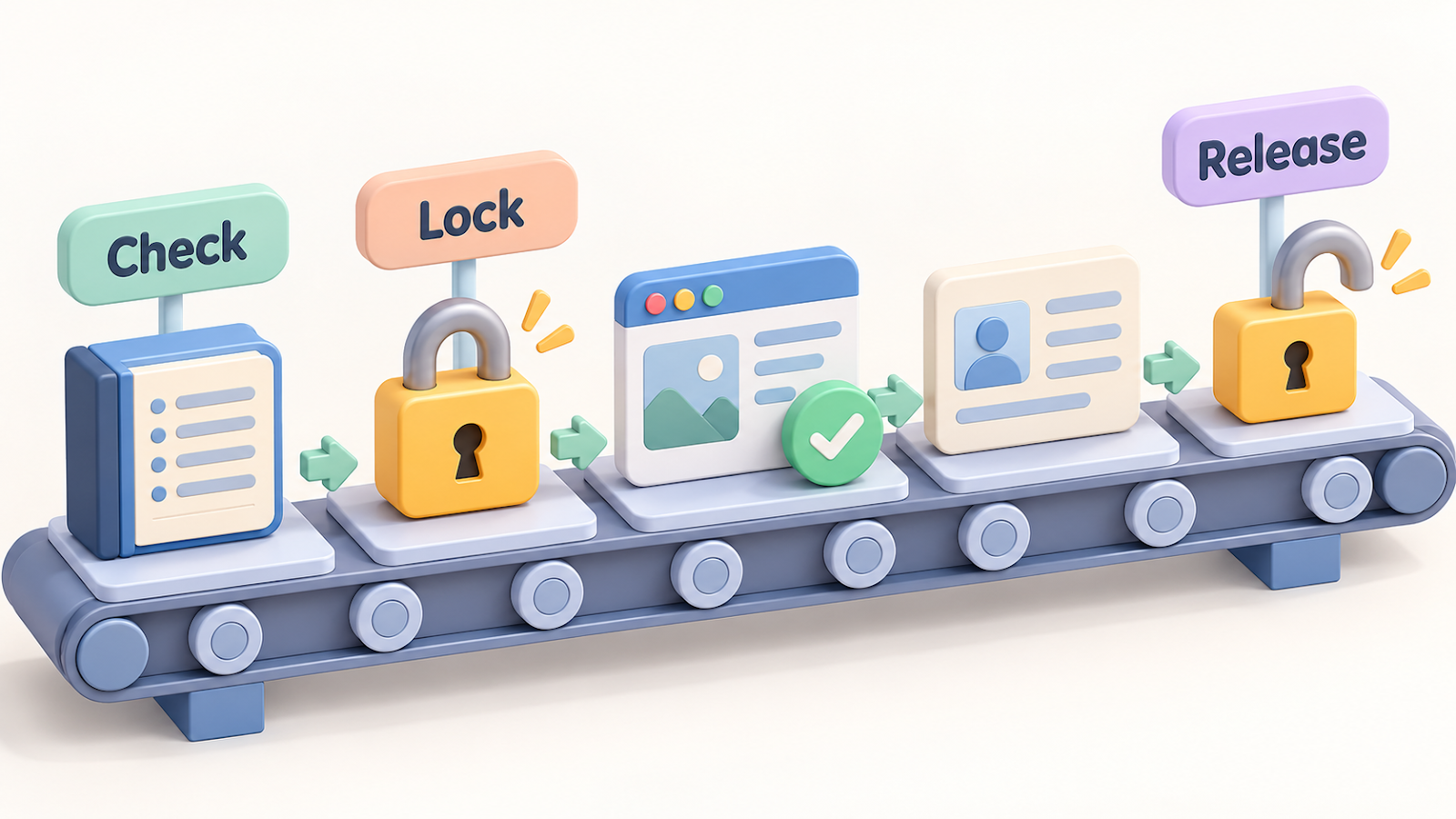
Check: ask whether the lock exists before you ask for it
The first move in my picture is Check.
Before the job tries to lock anything, it asks the shared record whether a lock is already on that blog.
If one is there, the job does not jump in.
It does not delete the lock file, and it does not force its way past.
It waits.
Wait: 20 looks, 30 seconds apart
The wait is fixed.
The job looks at the lock, sleeps 30 seconds, and looks again.
It repeats that up to 20 times, which adds up to about 10 minutes.
If the lock disappears inside that window, the job moves on to the next move.
Hold: if the lock is still there, skip this run only
If the lock is still there after the tenth minute, the job writes a hold note that says the run was skipped because the destination was busy or the record could not be read.
It stops and exits with an error code.
Nothing is published in that run.
The skip applies to this one run.
There is no code that tries again on its own the next day.
If I want the post to go out, I start it again after the lock is free.
There is no loop that keeps trying.

Photo: Pavel Danilyuk on Pexels
Lock and Release: only the one who locked can unlock
When the lock is free, the job creates it in a single step.
The lock records two things: who took it and which job it belongs to.
If someone else already holds it, the new request fails at once and prints those two details.
So I can always see whose lock it is and what it is for.
Release is the third move, and it comes last.
It happens after the live page has been read back and the record has been written.
The unlock command compares the requester with the stored lock.
It releases only when the owner and the job both match.
If either one differs, it refuses and prints the real owner.
That rule protects me from a tidy-minded agent that sees a lock and cleans it up.
It cannot clear a lock that belongs to a different agent or a different job.
Only the one who locked can open it.
When the page does not match: stop and mark it
After a publish, the agent opens the live result and compares it with what it meant to publish.
If they match, it records the outcome and then releases the lock.
If they do not match, it marks the record BLOCKED or FAILED.
It does not retry in silence.
This matters most for actions that can create a duplicate or delete something.
A quiet retry of a publish can put the same post online twice.
A marked failure gives me one clear thing to look at.
Once a record reaches SCHEDULED or PUBLISHED, only the publisher named in it may change it.
The other agent stays out unless I reassign it.
What good looks like
- The scheduled run finds the lock, waits, and either goes ahead or leaves a hold note.
- A wrong unlock attempt is refused, and the real owner is printed.
- A mismatch ends as BLOCKED or FAILED, never as a repeat attempt.
The takeaway
Check first, lock right before the change, release last, and let only the locker unlock.
When something is off, stop and mark it.
That is how two agents share one blog without stepping on each other.
If you run two agents on one destination, what should your scheduled job do when it finds a lock?
Tell me in the comments.
Related posts:
- I Switched From Claude Code to Codex: The Project Files That Preserved Context
- Two AI Agents, One Blog: A Shared Publishing Ledger
Thanks for reading.

Comments
Post a Comment